Pages

Tampilkan postingan dengan label TIPS AND TRIK. Tampilkan semua postingan

12.12.2009

Save Data on the CD scratched

At the present time data storage media the most secure, durable, large capacity and cheap is a CD (Compact Disc) and DVD. With the price of 52x Drive is practically CDWriter relatively inexpensive almost a prerequisite for the completeness of a PC. Market sold various brands and materials CD-R / CD-RW with the quality and price range.


CD quality is determined by the price sometimes expensive. Although they're expensive but if your treatment of the CD should not, of course this is nothing - nothing. Apart from any CD that you have, have a chance to scratch, mildewed, broken, and so forth.

Now what if we have a CD with data, files - important files in it can not be read because it scratched, moldy, etc.. On occasion this time will only give priority to writers tricks to save the data on scratched CDs.

via : udaramaya

11.30.2009

Becoming a Video Game Expert

Video Game Expert

If you find yourself playing video games day-in and day-out, you might be a prime candidate for establishing yourself as a gaming expert. All you need is a good knowledge of a wide range of games and gaming systems, and of course, a lot of patience. The rewards are phenomenal and in the end, you'll be a better person for it.


So what is an expert anyway? Just what is it that qualifies anyone to be an expert on anything? Since there aren't any colleges that offer degrees in this genre, we can qualify any gamer as an expert who has the qualities described above. So if you have the knowledge or ability to play a game skillfully - and you enjoy solving problems, you could probably claim the rights to an expert status.

Just be sure that you ensure your own growth in the gaming industry. Part of being an expert is admitting that there's always more to learn and in the gaming industry, this should never be a hard thing to pull off. By exposing yourself to new games and new game systems, you can turn every opportunity to play with one into an opportunity to learn more than what you already know. In doing so, you'll learn tons of new strategies and widen your resourcefulness as a point of help to others.

You could also make multiple efforts to collaborate with others involved with video games. Get off the game and get out into the public so that you can network and discuss your discoveries with others. Networking gives you the wonderful opportunities to share or swap secrets, teach others, and learn a little something new at the same time. And the relationships that you build as a result are simply invaluable. There's probably no other way you could gain access to little known gaming secrets than to network among the best gamers around.

If you're completely dedicated toward becoming a gaming expert, consider taking some classes in game programming. Seek out and apprenticeship and find training programs that are offered in both your local area and the gaming industry as a whole. This is an excellent way to learn everything anyone would ever want to know about gaming, and its a good entrance into the gaming industry if you aren't too crazy about making a commitment to a full time gaming career.

You could also subscribe to gaming magazines, participate in online discussion boards, or sign up for book clubs that focus on gaming material.

Take note that your status as a gaming expert may not always be appreciated. Strong criticisms - whether right or wrong - come with the glory of being perceived as the "answer to everything." As an example, you may be rejected for an opportunity that you feel you're perfect for, or you may experience the spew of a less-than-experienced heckler. The first rule of thumb is to not take rejection or spew personally. People may be jealous of your position, or they may want to test you just to see how much you really do (or don't) know. The reasons behind these reactions to your assistance don't really matter as long as you're confident about the quality and value behind your help. A true expert looks past these things and they constantly look for ways to improve themselves.

11.28.2009

How to transfer videos and music from ipod to mac

important for us to import the files into the mac, such as importing video and song to keep it well. because we will make a backup of all files on the ipod to the mac. to do that, things we have to do is as follows.


ipod to mac


Download This File

Step 1,
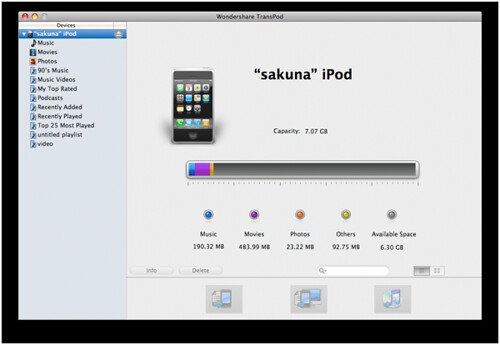
Launch this ipod to mac copy and connect your iPod with Mac. It can automatically detect your device and display related information such as type, capacity, version, etc.

Step 2,
Tick the video and audio files you would like to transfer from iPod to Mac. Here you could manage iPod content by deleting, creating or editing a playlist.

Step 3,
Click "iPod to Mac" image button to start to transfer from iPod to Mac.

Note:
If you want to transfer anything from Mac to iPod without iTunes, then click "Mac to iPod" image button to choose the required files from your Mac. You could also drag the required files from your Mac to iPod transfer for Mac directly.

via : tcmagazine

5.25.2009

To compile Eksploit In C

Often we are confused at the time of googling and we have the source code is not executable file. For people may be confused akan akan whether in this source code. Here I discuss how the source code at compile this in linux in order to run. Currently using Linux, if you install in its facility development, the GNU C Compiler (gcc) is usually an integral part of facilities development on Linux.

On Linux, the process of compiling can be done simply, with the command:

                                $ gcc eksploit.c –o eksploit

eksploit.c the file in which compile into executable in this case in the name eksploit (by command-o eksploit), which can then be run with the command:

                                $ ./eksploit

If you started programming in a complex with a lot of C source file, the file is usually assisted with a Makefile that will set the way-how to create & compile the object code of each source code
Thank you.

Referensi : Onno W. Purbo

By : dody_odonk.

4.30.2009

Quicker Opening Email in Linux Using Mozilla Thunder Bird

open the email to take long?
Normal we feel bored and irritated at the time of our connection down again and we want to open the email. Here I will give you tips for a busy person and always check their email. As in Windows with Microsoft Outlook on the linux with Mozilla Thunderbird.


The way it is:
  1. You must to have Mozilla Thunderbird, if you do not have please download here.
  2. Open mozilla thunderbird
  3. Appilcation → Internet → Mozilla Thunderbird
  4. Select email (if your email Gmail then select Gmail)
  5. Enter your name and email address
  6. Finish
  7. Insert your email password
  8. Click Get mail to see your email.

Now you can more quickly to open your email. You do not need a long time to open the email.
Hopefully this short tips will be useful for a friend - all friends.
Thank you.

By, Dody_odonk

4.28.2009

Change the Theme on the Gmail

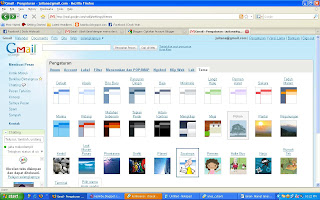
sometimes we feel bored with the theme of our email, which is always like that. Gmail now can we change our theme as we are. there are many themes that are in Gmail.


you can following :
  1. Login to your Gmail address
  2. Click settings
  3. Click on the theme
  4. Select a theme

Now you have a theme change
I hope these brief tips that can be useful for the friends
thanks

by: Dody_odonk

4.25.2009

How to Turn Off Autorun in Windows

we sometimes chafe at the flash and we should be exposed to the virus in the computers connect. autorunnya life because the virus is in the way of direct flash.
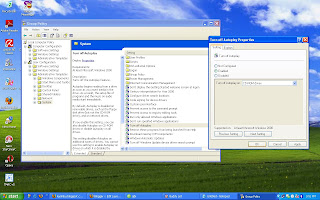
I will now give a very easy tips for how to turn off autorun in windows. is as follows.


1. click start
2. click run
3. type: gpedit.msc
4. select the administrative templates in the user configuration
5. select system
6. select turn off autoplay
7. select enable
8. ok

hopefully a very short tips can be useful for this friend - a friend.
thanks.

By : dody_odonk

4.03.2009

How to handle high-data flash is hidden because the virus

sometimes annoyed us because we are exposed to the virus flash. and especially the file that have been hidden inside. This little tips from me is using the command prompt:

  1. type cmd in the run from the start menu
  2. cmd and from the earlier we go to our flash drive
  3. we see in the windows explore first, the flash drive where we are
  4. from cmd and then type the name before we flash drive
  5. eg in the flash drive h:, then type in cmd us h:
  6. type the command: attrib-s-h / s / d. hidden file so that the chance
  7. then we press enter
  8. and after the data tersembunyikan already showing us flash back in, type in cmd and press enter and exit, so that flash can be well unplug

tips from me so hopefully useful
thanks

3.31.2009

In the Bandwidth Management Using Squid Delay Pools

This document describes how to configure your proxy server to limit download bandwidth or incoming traffic.
Next steps in the configuration management bandwidth squid:

  1. First check if squid is already running on the server and have dikonfiguraisi as a proxy server machine.
  2. Before starting the management of bandwidth in the squid, we first describe the components in the squid Management bandwidth:


delay_pools
This option is for specifying the exact amount of pool that is used to limit the amount of bandwidth from the ACL. This will be in the cluster with the option delay_class and delay_parameters which will be discussed below.


delay_class
This option specify the group from each pool that have been defined on the delay-pools option. There are three classes of Squid is supported, among others:

  • Class 1: All access is limited to the single bucket, this means only can define the overall bandwidth for an ACL course, can not define the bandwidth with more play.
  • Class 2: All Access is limited to the single agregate with two bandwidth parameters. The first parameter defines the maximum bandwidth is obtained by ACL, the second parameter defines the overall bandwidth for a specific ACL that is on the network is.
  • Class 3: Groups that definition to its most bandwidth-play. The first parameter defines the maximum bandwidth is obtained by ACL, the second parameter defines the bandwidth of normal ACL obtained in general, and the third parameter defines the bandwidth is obtained if the ACL to access ACL-ACL certain specific, such as mp3 files.


delay_parameters
This formula specify the bandwidth that will be obtained by the ACL enter akan delay_pool. For example there is the following entry in the delay_parameters:
delay_parameters 1 -1/-1 2100/4000
Number 1 means that the formula is valid for pool 1. Figures -1/-1 means that the maximum bandwidth provided Squid is not limited to this pool.

2100/4000 figures mean bandwidth obtained by the ACL entry to this pool. This number is located in the multiplier 8 b, so to get the actual value of the bandwidth must be multiplied by eight. 2100 figures is that the bandwidth available on the ACL times normal. If multiplied by 8, then the bandwidth will be a normal ACL about 18 Kbps. 4000 figures is the maximum bandwidth available on the ACL-time path are empty. If multiplied by 8, the bandwidth obtained about 32 Kbps.

delay_access
This defines who ACL that will be entered into a pool for the "slowing" bandwidth. General form is like this:
delay_access 1 allow labprog
The above option means that we enter into the ACL labprog pool 1.
3. If you already understand the components delay pool, we start delay pool configuration. Umpamakan we have in the bandwidth from the ISP is 512KB, and we make a rule like the following:
- Limit overall connection speed is 256 Kbps. per-network is 64 kbps. Meanwhile, 2 Kbps per-user/host limited when used for file downloads bertipe exe, mp3, vqf, tar.gz, gz, rpm, zip, rar, avi, mpeg, MPE, mpg, qt, ram, rm, iso, raw , and wav. If not, then the connection perhost ONLY the rules per-Network only.

Settlement:


Edit the file / etc / squid / squid.conf
# vi / etc / squid / squid.confLalu add this configuration example:
# Before we make a restriction, we need to define the ACL network # # we need first. ACL defined on the host bridge
# As below: src 192.168.1.0/24 acl local # Then we limit the maximum download the tag below:
# Limit overall connection speed is 256 Kbps. per-network is
# 64 kbps. Meanwhile, 2 Kbps per-user/host limited when used for
# Bertipe exe file download, mp3, vqf, tar.gz, gz, rpm, zip, rar, avi,
# Mpeg, MPE, mpg, qt, ram, rm, iso, raw, and wav. If not, then
# Connection perhost ONLY the rules per-Network only.

acl filegede url_regex-i \. exe
acl filegede url_regex-i \. mp3
acl filegede url_regex-i \. vqf
acl filegede url_regex-i \. gz
acl filegede url_regex-i \. rpm
acl filegede url_regex-i \. zip
acl filegede url_regex-i \. rar
acl filegede url_regex-i \. avi
acl filegede url_regex-i \. mpeg
acl filegede url_regex-i \. MPE
acl filegede url_regex-i \. mpg
acl filegede url_regex-i \. qt
acl filegede url_regex-i \. ram
acl filegede url_regex-i \. rm
acl filegede url_regex-i \. iso
acl filegede url_regex-i \. raw
acl filegede url_regex-i \. wav

# We first create ACL to define the files by using the above # regularexpression. Then we define the 2 delay pool for
# Accommodate bandwidth.
# One entry pool in class 2 for defining the overall policy
# Per 256-Kbps and 64 Kbps network. One other pool incoming class category 3
# To define additional rules, if a user downloads files
# defined in the ACL url_regex with a maximum bandwidth of 2 Kbps.


delay_pools 2
delay_class 1 3
delay_parameters 1 32000/32000 8000/8000 250/250
delay_access 1 allow local filegede
delay_access 1 deny all
delay_class 2 2
delay_parameters 2 32000/32000 8000/8000
allow local delay_access 2
delay_access 2 deny all

If you are finished, save the configuration and restart squid


# / etc / init.d / squid restart

Source: http://miji.wordpress.com/2007/02/06/57/ # comment-21

Full information can be viewed at: http://ezine.daemonnews.org/200209/squid.html